

Work as a team in ChartOmodo
Before you start
Teams comes with the Business plan. On it, your organization has 3 seats, and you hold one of them as the owner. Members and invitations that have not expired both use a seat. Pricing lists every plan.
Invite a teammate
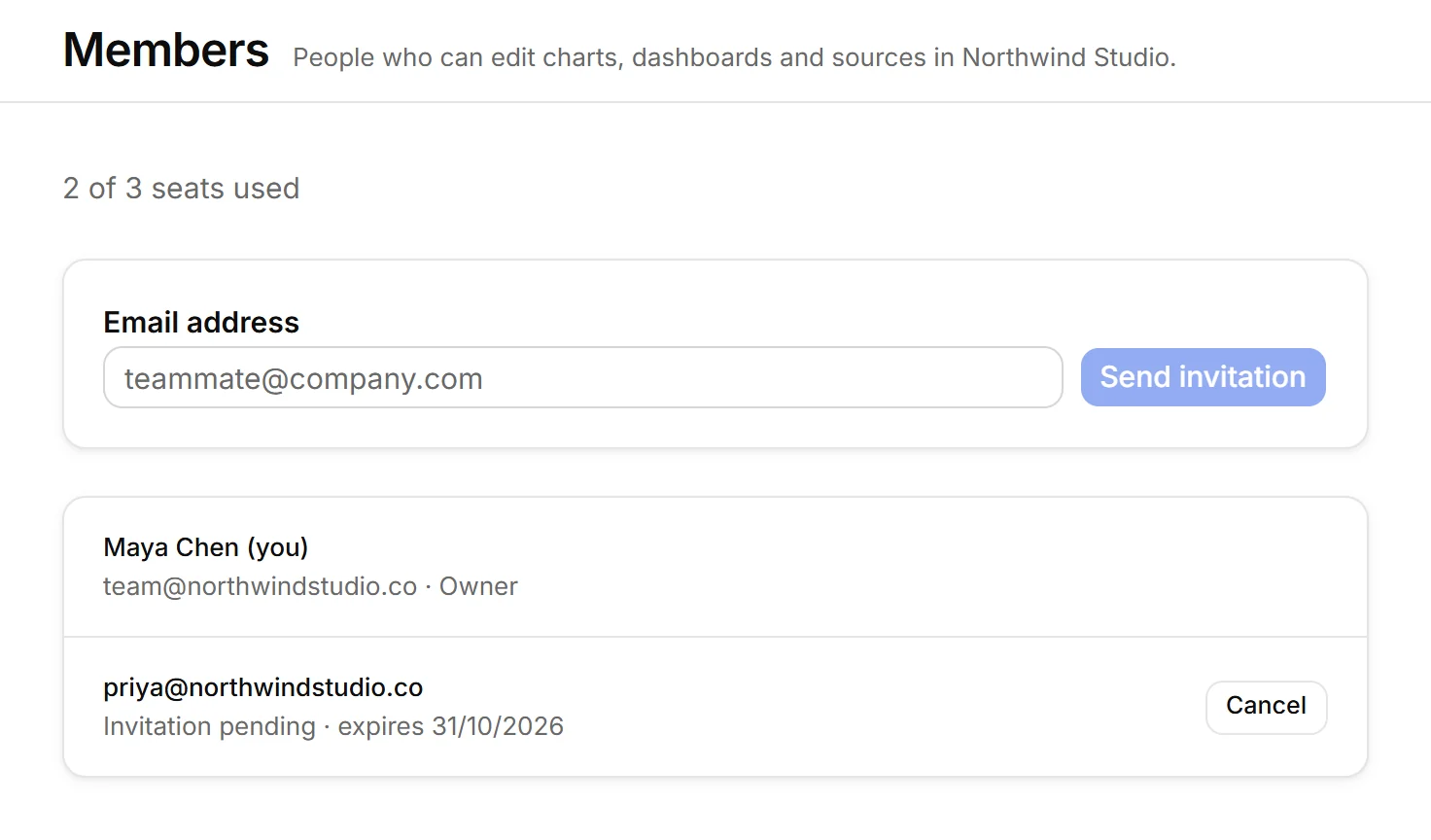
- Open Members in the sidebar. The line at the top shows how many seats are used.
- Type your teammate’s address under Email address and press Send invitation.
- They get an email with a link; it says how many days the invitation lasts. The invitation waits on the list with its expiry date; Cancel withdraws it. To send it again, cancel it and invite again.
Your teammate then:
- Opens the link and signs in with the address the invitation went to.
- Presses Accept and join. ChartOmodo opens your organization for them.
Roles
- Owner: the person whose organization it is. Only the owner invites, cancels invitations and removes members. The organization runs on the owner’s plan. The owner can’t leave or be removed.
- Member: edits the organization’s charts, dashboards and sources, and can leave at any time.
Those are the only two roles, and a role can’t be changed.
What a team shares
- Charts, dashboards and data sources belong to the organization. Everyone in it can open and edit them.
- Limits come from the owner’s plan, whoever does the work.
- Your own organization stays yours. Once you belong to more than one, switch between them with the picker in the sidebar.
Leave or remove
- To remove a member, if you are the owner, open Members, press Remove next to them and confirm. They lose access at once. What they made stays.
- To leave an organization you joined, open Members, press Leave this organization and confirm. You lose access to its charts, dashboards and sources at once.
If it does not work
The link says the invitation no longer works
It was cancelled, already used, or it expired. Ask the owner to invite you again.
The invitation is for another address
You are signed in with a different email. Press Sign out and switch account, then sign in with the address the invitation went to.
It asks you to verify your email first
Joining needs a confirmed address. Press Send verification link and open the email: it brings you back to the invitation.
Every seat is taken
Send invitation stays off and the form says: “Every seat on your plan is taken. Remove a member or cancel an invitation to invite someone else.” If seats run out before a teammate accepts, they are asked to have the owner free a seat.
There is no Members item or invite form
Members appears in the sidebar once your plan includes Teams or your organization already has members. Only the owner sees the invite form. If your plan does not include Teams, an upgrade offer takes its place. While your account is suspended, the page says: “Inviting is paused while your account is suspended.”
An organization shows as locked
Its owner’s account is suspended, the owner’s plan no longer includes Teams, or it has more members than that plan allows. Members can’t open it until the owner fixes that, and the same lock stops new members from joining. You can still leave it from the link under the picker.
Questions
Does a teammate need a paid plan of their own?
No. A team runs on its owner's plan, and its limits come from that plan. A teammate needs a ChartOmodo account; their own organization keeps their own plan.
Does a pending invitation use a seat?
Yes. Members and invitations that have not expired both count, so cancel an invitation nobody will accept to free its seat.
What happens to a chart when the person who made it leaves?
It stays. Charts, dashboards and sources belong to the organization. Only the API tokens that person created there are revoked.
Can I hand the team to someone else?
No. An organization has one owner and members, and roles can't be changed.